HomeWire home network lab
Fix It: Wi-Fi & Network Troubleshooting

How to Cancel Virgin Broadband Without Paying a Penalty

By the HomeWire team Updated 2026 Tested in real UK homes

If you want to cancel Virgin broadband without paying more than you have to, the single most useful thing to know is this: do not ring Virgin Media. Call them and you will be told you owe 30 days’ notice. Switch to a new provider instead and, by Virgin’s own account of the rules, you owe no notice at all.

That is not a loophole. It is how switching has legally worked since September 2024, and it is worth understanding properly, because Virgin Media’s own website says both things in different places and its call centre staff have repeatedly told customers the wrong one.

The 30-day notice rule, and the exception that cancels it

Virgin’s leaving page states you must give 30 days’ notice to cancel, and says this applies whether or not you are switching providers.

Virgin’s own explanation of One Touch Switch says the opposite, and it is the one that reflects the current rules. In its words, One Touch Switch means your new provider “handles everything about the switch for you, including cancelling with your old provider”. It goes on: “you won’t need to contact your old provider to let them know you’re leaving. You’ll also no longer need to provide a 30-day notice period.” And on the money: “Customers don’t have to pay notice-period charges beyond the switch date either, so there’s no more paying for an old service you’re not using after the new one starts.”

Both statements are on virginmedia.com. Only one of them saves you a month’s line rental.

The resolution is simple:

  • If you are moving to another broadband provider: use One Touch Switch. Contact only the new provider. No notice, no notice-period charges past the switch date.
  • If you are cancelling outright and not taking a new service (moving abroad, moving in with someone, going mobile-only): there is no switch to trigger, so the 30 days’ notice genuinely applies.

Most people cancelling Virgin are in the first group and pay as though they were in the second.

How One Touch Switch actually works

One Touch Switch launched in September 2024 and covers UK fixed broadband. The process is deliberately dull:

  1. Choose your new provider and place the order with them. That is the whole of your involvement with cancelling.
  2. The new provider contacts Virgin Media behind the scenes and cancels the service for you.
  3. Both providers coordinate the switch date so the new service starts as the old one ends.
  4. You do not contact Virgin at all.

Virgin says there is no need to worry about double-charging because the billing and activation dates are handled between the operators. That is the intended design.

When you will still pay: early disconnection fees

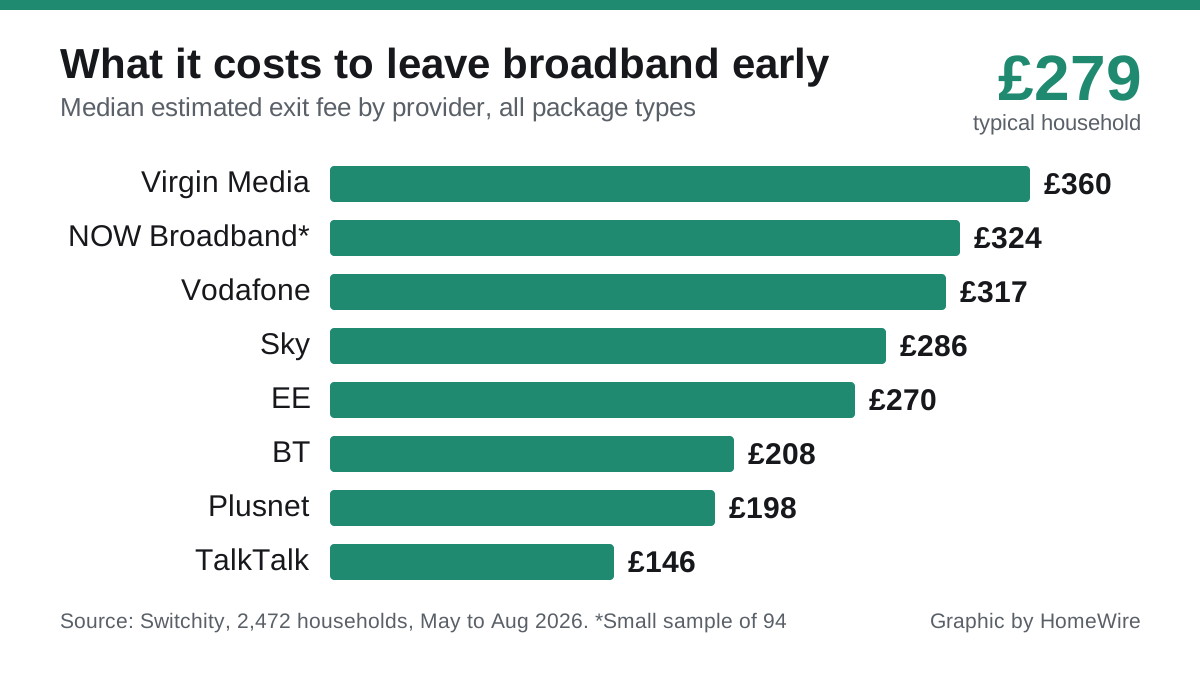
None of the above rescues you from an early disconnection fee if you are still inside your minimum term, which for Virgin is typically 24 months.

Virgin’s position is that the fee depends on your services, what you pay including any discounts, and how much of the minimum term is left, and that they will tell you the amount before you cancel. In practice it works out as roughly what you would have paid for the remaining months.

Three situations where you owe nothing:

  • Your minimum term has ended. The contract rolls monthly and you can leave with no early disconnection fee.
  • You are within 14 days of taking out the contract. Under the Consumer Contracts Regulations you can cancel a contract taken out online, by phone, by email or at your door within 14 days for any reason, without a fee.
  • Virgin raised your price beyond what you agreed. See below, because this is the one worth checking.

The price rise exit that most people miss

This is the strongest card most Virgin customers hold and almost nobody plays it.

Under Ofcom’s rules, if a provider increases your price mid-contract in a way that was not clearly specified when you signed up, it must give you one month’s notice and the right to exit penalty-free. That means walking away from your minimum term with no early disconnection fee.

From 17 January 2025, Ofcom went further and banned inflation-linked and percentage-based price rise terms in all new contracts. Any price rise written into a contract from that date has to be set out in pounds and pence, prominently, at the point of sale, along with when it will happen. The catch is that the ban is not retrospective, so it applies to contracts taken out from 17 January 2025 onwards, and older contracts can still carry the old inflation-linked terms.

The practical check: when a price rise letter or email arrives, read it against what you were told at sign-up. If the increase was not spelled out in advance in pounds and pence, you generally have a 30-day window to leave without penalty. Ofcom’s own research found only 16% of broadband customers on inflation-linked contracts both knew about their price rise and understood it was inflation-linked, which is the entire reason this right goes unused.

The final bill trap

Here is where to keep your guard up, because it is the most commonly reported problem with leaving Virgin.

Despite One Touch Switch, there is a well-documented pattern of Virgin Media continuing to bill customers for a further month after a switch, with staff telling them a 30-day notice period still applies, sometimes at the higher out-of-contract rate. The stated cause is usually that Virgin says it never received the switch notification from the new provider, leaving the account open.

Protect yourself:

  • Keep the switch order confirmation from your new provider, with the date.
  • Watch the Virgin bill after the switch date. Do not assume the direct debit stops itself.
  • Cancel the direct debit only after the closing bill is settled, not before, or you risk a default marker for non-payment.
  • If you are billed past the switch date, quote One Touch Switch and Virgin’s own wording about notice-period charges not applying beyond the switch date. If they refuse, you can escalate to Virgin’s complaints process and then to the ombudsman scheme after eight weeks, or sooner with a deadlock letter.

The last two jobs

Return the equipment. Virgin will either collect it or send you a returns pack free of charge. Do not skip this, as unreturned kit gets charged for.

Save your email. If you use a Virgin Media email address, you lose access to it 90 days after disconnection. Move anything you need out before then and change the address on your important accounts, which is the part people remember three months too late.

Then check your closing bill covers service up to the disconnection date and nothing beyond it.

Before you go: is it the broadband or the Wi-Fi?

Worth a moment’s thought, because a decent number of people cancel a perfectly good connection over a fixable problem in their house. If the complaint is buffering in the back bedroom rather than the line itself, our guides to Wi-Fi dead spots, why your Wi-Fi is slow and why broadband slows down in the evening are worth ten minutes before you sign a new 24-month contract with someone else and discover the same thing.

Frequently asked questions

How do I cancel Virgin broadband without paying a penalty? If you are moving to another provider, place the order with the new provider only and let One Touch Switch handle it. Virgin states that with One Touch Switch you do not need to give a 30-day notice period or pay notice-period charges beyond the switch date. If you are still in your minimum term, an early disconnection fee may still apply unless you are leaving after a price rise or within the 14-day cooling-off period.

Do I have to give Virgin Media 30 days’ notice? Only if you are cancelling outright rather than switching. Virgin’s leaving page says 30 days’ notice is required, but its own One Touch Switch page confirms that switching to a new provider removes the notice requirement, because the new provider cancels for you.

How much is Virgin Media’s early disconnection fee? It varies. Virgin says it depends on your services, what you pay including discounts, and how much of your minimum period remains, and that it will tell you the amount before you cancel. It broadly reflects the remaining months of your contract.

Can I leave Virgin Media if they put the price up? Often, yes. Ofcom’s rules give you one month’s notice and the right to exit penalty-free if a provider raises prices mid-contract beyond what was clearly agreed at sign-up. Since 17 January 2025, new contracts must state any rise in pounds and pence upfront, though the ban is not retrospective.

Do I need to contact Virgin Media if I’m switching? No. Under One Touch Switch, introduced in September 2024, you contact only your new provider, which cancels your Virgin service for you and coordinates the dates. Virgin’s own guidance says you will not need to contact them.

What happens to my Virgin Media email when I leave? You lose access 90 days after disconnection. Move anything important out and update the email address on your bank, utility and shopping accounts before that window closes.

// more from HomeWire
Why Is My Wi-Fi So Slow? 12 Fixes That Actually Work (UK)
Fix It: Wi-Fi & Network Troubleshooting

Why Is My Wi-Fi So Slow? 12 Fixes That Actually Work (UK)

Why is my Wi-Fi so slow? 12 tested UK fixes, from router placement and 5GHz to channel changes and your Ofcom minimum-speed rights.

Wi-Fi Keeps Dropping or Disconnecting? Step-by-Step Fix
Fix It: Wi-Fi & Network Troubleshooting

Wi-Fi Keeps Dropping or Disconnecting? Step-by-Step Fix

If your wifi keeps dropping, work through these UK fixes in order: restart the router, change the channel, split the bands and check for a line fault.

Ethernet Connected But No Internet? How to Fix It
Fix It: Wi-Fi & Network Troubleshooting

Ethernet Connected But No Internet? How to Fix It

Ethernet connected but no internet? Work through these ordered UK fixes, from a quick router reboot to DHCP, DNS and driver repairs that get you back online.

How to Log Into Your Router at 192.168.1.1 (UK Routers)
Set Up & Get Online

How to Log Into Your Router at 192.168.1.1 (UK Routers)

A step-by-step 192.168.1.1 router login guide for UK routers, plus the correct IP for BT, Sky, Virgin, TalkTalk, EE and Plusnet hubs.

How to Change Your Wi-Fi Channel to Stop Interference
Set Up & Get Online

How to Change Your Wi-Fi Channel to Stop Interference

How to change your Wi-Fi channel to stop interference: best 2.4GHz and 5GHz channels, plus steps for BT, Sky, Virgin and TalkTalk routers.

Mesh Wi-Fi vs Extender vs Powerline: Which Beats Dead Spots?
Gear: Mesh, Extenders & Adapters

Mesh Wi-Fi vs Extender vs Powerline: Which Beats Dead Spots?

Mesh vs extender vs powerline compared for UK homes: which one actually fixes Wi-Fi dead spots, with real speeds, costs and setup tips.

Wi-Fi Channel Finder
Tools

Wi-Fi Channel Finder

Best Wi-Fi channel finder for UK homes: read your phone's Wi-Fi scan and get the least-crowded 2.4GHz, 5GHz and 6GHz channel to switch to.

Broadband Speed Calculator: How Much Do You Actually Need?
Tools

Broadband Speed Calculator: How Much Do You Actually Need?

Free broadband speed calculator: tell us your household and we work out how much broadband speed you need, in Mbps, for the UK.

Mesh Node Planner
Tools

Mesh Node Planner

Free UK mesh node planner: answer how many mesh nodes do I need for your home's size, floors and walls, with a printable placement plan.

How to Fix Wi-Fi Dead Spots at Home: 9 Proven Fixes
Fix It: Wi-Fi & Network Troubleshooting

How to Fix Wi-Fi Dead Spots at Home: 9 Proven Fixes

Fix Wi-Fi dead spots at home with 9 proven steps, free fixes first: router placement, band, channel, mesh, wired backhaul and UK ISP kit explained.

Best Mesh Wi-Fi Systems UK 2026: Tested and Compared
Gear

Best Mesh Wi-Fi Systems UK 2026: Tested and Compared

The best mesh Wi-Fi systems for UK homes in 2026, ranked by coverage, value and backhaul. Wi-Fi 6, 6E and 7 picks for brick and stone walls.

How to Reset Your Router Without Losing Your Settings
Set Up & Get Online

How to Reset Your Router Without Losing Your Settings

Restart fixes most problems and keeps every setting. Factory reset wipes the lot. UK hub-by-hub steps for BT, Virgin, Sky and EE, plus what to save first.

What Is a Good Ping for Gaming and How to Lower It
Speed & Coverage

What Is a Good Ping for Gaming and How to Lower It

A good gaming ping is under 30ms for competitive play, under 50ms casual. Here is how to lower it: go wired, pick a near server, and fix Wi-Fi and QoS.

BT, Sky, Virgin and EE Router Default Passwords Explained
Set Up & Get Online

BT, Sky, Virgin and EE Router Default Passwords Explained

There is no master password for BT, Sky, Virgin or EE hubs. Where each default actually lives, Wi-Fi vs admin passwords, and what a reset restores.

Why Your Broadband Slows Down in the Evening (and What to Do)
Fix It: Wi-Fi & Network Troubleshooting

Why Your Broadband Slows Down in the Evening (and What to Do)

Broadband slow in the evening? Here's why UK speeds dip around 9pm, how to test if it's your line or Wi-Fi, and what actually fixes it.

2.4GHz vs 5GHz vs 6GHz: Which Band Should You Use and When
Speed & Coverage

2.4GHz vs 5GHz vs 6GHz: Which Band Should You Use and When

Which Wi-Fi band to join, when, for UK homes. A use-case table, the physics, Ofcom rules, plus 6GHz, WiFi 6E/7 and merge-vs-split SSID advice.

How to Run an Ethernet Cable Through Your House Tidily
Set Up & Get Online

How to Run an Ethernet Cable Through Your House Tidily

A practical UK guide to running Ethernet cable through your house tidily: planning routes, choosing cable, wall and floor runs, terminating and safety.

Long Ethernet Cable: Which Length and Category to Buy
Gear: Mesh, Extenders & Adapters

Long Ethernet Cable: Which Length and Category to Buy

Buying a long Ethernet cable for a UK home? Which length and category to pick, why length barely affects speed, and outdoor and in-wall rules.

What Is Broadband? A Plain-English Guide for UK Households
Set Up & Get Online

What Is Broadband? A Plain-English Guide for UK Households

What is broadband, in plain English: the UK types explained, real speeds vs the headline numbers, and what the 2027 copper switch-off means for you.

Smart Wi-Fi: What It Means and Why Your Next Router Needs It
Speed & Coverage

Smart Wi-Fi: What It Means and Why Your Next Router Needs It

What smart Wi-Fi actually means: band steering, mesh roaming, app control and device priority explained in plain English, and whether you really need it.

BT WiFi Hotspot: How to Use It When You're Away From Home
Speed & Coverage

BT WiFi Hotspot: How to Use It When You're Away From Home

How a BT Wi-Fi hotspot works, how to connect with your BT ID or the app, the BTWifi-with-Fon network, and how it now ties into EE Wi-Fi.

Cat 6 Ethernet Cable: What to Know Before You Buy
Gear: Mesh, Extenders & Adapters

Cat 6 Ethernet Cable: What to Know Before You Buy

A plain-English Cat 6 Ethernet cable guide for UK homes: how it compares to Cat5e and Cat6a, real speed limits, shielding, and which cable to actually buy.

Outdoor Wi-Fi Extender Guide: Garden, Garage and Outbuildings
Speed & Coverage

Outdoor Wi-Fi Extender Guide: Garden, Garage and Outbuildings

An outdoor wifi extender can push your network to the garden, garage or outbuilding. How they work, IP ratings, PoE, and how to choose the right one.

Gear: Mesh, Extenders & Adapters

HDMI Extender Guide: Send an HDMI Signal Over Long Distances

An HDMI extender sends video and audio far beyond a normal cable's limit. How the main types work, their real distances, and how to choose the right one.

Gear: Mesh, Extenders & Adapters

PoE Switch Explained: Power Over Ethernet for Home and Small Office

A PoE switch explained in plain English: how Power over Ethernet works, the PoE, PoE+ and PoE++ standards, what it powers, and whether you need one at home.

Gear: Mesh, Extenders & Adapters

Gigabit and 2.5Gb Network Switches: Is the Upgrade Worth It?

A plain guide to gigabit and 2.5Gb network switches for the home: what a switch does, when 2.5GbE is worth it, managed vs unmanaged, and which type to buy.

Gear: Mesh, Extenders & Adapters

VoIP Adapter Explained: Keep Your Landline When You Switch to Fibre

A VoIP adapter lets you keep your old landline phone on full fibre. Here is how an ATA works, when you need one, and the power-cut catch to plan for.

Set Up & Get Online

Wi-Fi Repeater Setup: Extend a Wireless Network Room by Room

A plain-English wireless Wi-Fi repeater setup guide: WPS and manual methods, where to place it, same or separate SSID, and fixes when it slows your speed.

Fix It: Wi-Fi & Network Troubleshooting

BT Router Flashing Purple or Pink? Meaning and How to Fix It

A BT router flashing purple or pink means no broadband connection. Here is what each BT Hub light colour means and the exact steps to get back online.

Set Up & Get Online

Ethernet Wiring Diagram: How to Wire an RJ45 Plug and Wall Socket

A clear ethernet wiring diagram for UK homes: the T568A and T568B colour order, how to wire an RJ45 plug and wall socket, and the one rule not to break.

Speed & Coverage

Network Booster for Mobile: How to Improve Phone Signal at Home

A network booster for mobile can help weak indoor signal, but UK rules matter. How to improve phone signal at home legally, with Wi-Fi Calling and Ofcom rules.

Gear: Mesh, Extenders & Adapters

USB-C to USB Adapter: When You Need One and What to Look For

A plain guide to the USB-A to USB-C adapter: which direction you need, the speed and power ratings that matter, OTG for phones, and how to avoid a bad one.

Gear: Mesh, Extenders & Adapters

USB Extender Cable: Extend USB Beyond 5 Metres Without Signal Loss

How to use a USB extender to run USB past its 5 metre limit: active repeater cables, USB-over-Ethernet extenders and optical cables, plus what actually works.

Gear: Mesh, Extenders & Adapters

USB to Ethernet Adapter: Get a Wired Connection With No Port

A plain-English USB to Ethernet adapter guide: how to pick USB-A or USB-C, why gigabit speed and the chipset matter, and how to get a solid wired connection.

Set Up & Get Online

Broadband Without a Phone Line: Your UK Options Explained

Getting broadband without a phone line in the UK: full fibre, SoGEA, 4G and 5G options, the 2027 landline switch-off and how to drop line rental.

Gear: Mesh, Extenders & Adapters

KVM Switch Guide: Share One Keyboard and Monitor Across PCs

What a KVM switch does, why EDID emulation decides whether yours is usable, and how to pick one for 4K, dual monitors or a work laptop plus a home PC.

Home Wi-Fi News: June 2026
News

Home Wi-Fi News: June 2026

Wi-Fi 8 chipsets break cover, Lightning Fibre rolls out Wi-Fi 7 routers, and Community Fibre cuts 1Gbps with a Wi-Fi 7 router to £20 a month.

Home Wi-Fi News: June 2026
News

Home Wi-Fi News: June 2026

UK leads Europe on Wi-Fi 6 and 7 take-up, Openreach trials a fuller FTTP install, O2 Broadband may return, and the fastest UK ISPs for H1 2026 are named.

Home Wi-Fi News: June 2026
News

Home Wi-Fi News: June 2026

A speed-test study finds 18% of UK homes below 10Mbps, two altnets widen full fibre choice, and Brillband makes a Wi-Fi 7 router standard from 1 July.

News

UK Broadband News: July 2026

An Openreach fault froze ISP ordering systems, altnets launch Broadband Independents' Day, and an MP tables a bill to ban mid-contract price rises.
Speed & Coverage

WiFi Antenna Upgrade: When an External Antenna Improves Your Range

Does a wifi antenna upgrade improve your router's range? When a high-gain external antenna helps, when it cannot, and what to try instead.
Gear: Mesh, Extenders & Adapters

WiFi Adapter for PC: USB Dongles vs PCIe Cards Compared

A clear comparison of USB and PCIe wifi adapters for a PC: speed, latency, ease of fitting, and how to choose the right one for your desktop and router.

// stay on the network

Fix one dead zone a week.

Plain-English fixes for British homes: router settings worth changing, mesh kit that actually works, and the speed-test results that matter. One email, no jargon, unsubscribe anytime.

● No spam. Roughly fortnightly. UK-focused.